
You are browsing the archive for OS.

Who stole my butter? Solving slowness probelms in Galaxy Note after Jelly Bean update

April 9, 2013 in Galaxy Note Guides

slow-jelly-beanJelly Bean 4.1 updated for Galaxy Note has been rolled out in phases since February 2013. This update brings Galaxy Note owners many excited improvements, new features and apps. Some of the new features were explained in  the Top 12 new features you should try after getting Jelly Bean 4.1 update for Galaxy Note.

However, some users reported serious slowness issues after the Jelly Bean update in their Galaxy Notes. It seems the Project Butter is nothing, or Samsung stole our butter.

What are the causes, and what are the solutions?

First, Galaxy Note is powerful enough for running Jelly Bean smoothly. 1GB RAM, and dual core 1.4GHz Exynos 4 Dual 4210 chip are still decent hardware specifications even after1.5 years. A lot of middle range Jelly Bean handsets has far less powerful hardware specifications.

So, do not suspect your hardware. Jelly Bean is not hungry for hardware. Any hardware that can run Ice Cream Sandwich should meet the requirements of Jelly Bean. A lot of manufactures do not give Jelly Bean update simply because  they do not want to put more resources on an old model. In this sense, Samsung did an excellent job.

The slowness problem in Jelly Bean update lies on the update itself. When you update the system, most of your old settings will be kept, some are necessary, some are unnecessary . Some of these settings are fully compatible with Jelly bean; some are compatible  but with degraded performance. For the known incompatible settings, the update will handle them. The biggest issue is that some old settings are not compatible to the new OS/ROM, but it is unknown yet.  Therefore, for the slowness caused by such problematic settings, a factory reset will solve the issue.

Please be careful when performing the  factory reset because it will erase your internal storage. You need backup all your data in the internal storage, including your contacts and messages. Apps can be re-installed, but the settings will be gone. If you have rooted your phone, you can use Titanium Backup  to backup and restore almost everything. If your phone is not rooted, you may try Carbon to backup and restore your apps. You may check this tutorial on how to use this app.

Of Course it is a good idea to use Kies to backup  all supported items (contacts, messages, s notes, photos…) to your PC. After resetting, you can restore the backup.  But you should never rely on Samsung’s Device backup. It is not reliable based on my personal usage.

Sometimes, the slowness is due to insufficient available RAM. Yes, I just said our Galaxy Note has sufficient RAM (1GB)  for Jelly Bean. Even you add up all Samsung’s TouchWiz, and all bloatware from Samsung and from your local carriers, the 1GB RAM (800-900MB accessible) should be able to handle all apps easily. So, why is there this  insufficient RAM issue?

As discussed in Why did I get less free RAM after the ICS update in my Galaxy Note? Android is very efficient in memory management. The RAM in our Note has 4 portions: reserved, used, cached, and available.  Reserved part is for system devices, e.g., GPU, in this Jelly Bean update, it is about  130-140MB. So, about 860MB is available for Android, and all stacks over it. Among this 860MB, Jelly Bean actually only require less than 200MB, slightly more than Ice Cream Sandwich. The TouchWiz UI (aka Samsung’s skin) is over-bloated, and needs about 200MB. This implies users get more than 400MB for their apps. This is more than enough for any app in the Play Store.

But in our Galaxy Note, there are some bundled apps (bloatware) from Samsung and local carriers, e.g, Yahoo Finance, Learning Hub, always running because these apps mark themselves as essential (it will restart itself if you kill them use task manager), although they are not essential.

An app can also listen to reboot or start services, and therefore launches itself when you reboot your phone. So, immediately after you reboot your Galaxy Note, if your Note uses more than 600MB RAM, you may have RAM issue with apps. Your Note may be sluggish gradually. You can read the RAM info in any task manger or through Application Manager–running. If this happens, it simply means you have too many apps either marking them as essential (usually bundled ones) or trying to auto-restart themselves. You should check the RAM before using any other apps except task manager. Only check this immediately after rebooting.

So, the solution for the slowness problem caused by insufficient available RAM includes:

  1. disabling some unnecessary bundled apps (of course, if your Note was rooted, you can uninstall them). You should be very careful and only disable the apps that you are not going to use. This can be done in Application Manager–all. For each apps, you can choose disable. If there are updates installed, you need uninstall the update first, then to disable.
  2. preventing some apps to start automatically. You can go to Application  Manager–downloaded. For each app,  you can choose “force stop” if it is not grayed out. During the Jelly Bean update process, the updater actually marked all old apps to start automatically! This was done in the optimizing apps stage in the updating process.  Force stop may be not consistent (depending on app). So, a more powerful approach is to use some autorun manager. For non-rooted phones, you may try an app called Autorun Manager (in basic mode).


To sum up, if you feel your Galaxy Note is getting slower after the Jelly Bean update, you may try:

  • Step 1: Back up all important data in the internal storage. You may use Kies for some files, contacts, S Notes, messages, photos, and Carbon for app settings. Make sure the backup is in a safe place.
  • Step 2.: Perform a factory reset (settings–backup and reset)
  • Step 3: Disable some unnecessary bundled apps;
  • Step 4: Reboot and monitor the RAM usage. The used RAM  immediately after reboot should be less than 600MB.
  • step 5: Re-install backups from Kies
  • Step 6: Re-install apps one by one  from Play Store.
  • Step 7: Reboot
  • Step 8: Force stop all downloaded apps,
  • Step 9: Install Autorun Manager, and disable most apps in the list (in the Basic Mode)
  • Step 10: Reboot and check.

Is the slowness problem in your Galaxy Note solved? If not, post your questions in the comments box below of discuss it with other Galaxy Note owners in Galaxy Note discussion forum.


Galaxy Note Android 4.0 ICS source code is available now, why Samsung must release the source code?

May 23, 2012 in Galaxy Note Guides, Galaxy Note News, Galaxy Note Reviews

Today, Samsung finally released the Android 4.0 (ICS) source code for Galaxy Note. If you are enthusiastic developer, you can work out your own ROM now very easily. Very likely, within one month, several different flavors of Galaxy ICS ROMs will be floating around.

open-source-softwareWhy does Samsung (and all other licensed Android hardware manufactures) have to release the source code to the public?  This is simply the obligation of using Android, because Android is using Apache license 2.0 except the Linux Kernel (which uses GPL v2 license).
Under Apache 2 license, user has the right to get the source code so that they can modify as they want (although this very likely will void the product warranty). So, the manufacturer MUST make the source code available to users, but it is NOT necessary to be under Apache license. For example, Samsung has its own license on using the the Android source code released by Samsung.

The Linux Kernel is released under GPLv2 license, which requires all modified work must also be released under such a license. Sometimes, this is named as “copyleft” license. Under this license, user get more controls of the source as manufactures are NOT allowed to impose additional terms on using the source code.  But due to its copyleft obligation, manufacturers usually want to avoid such license for competition reasons.

Although there are some critics on the openness of Android project,  Android is unarguably the best open source OS for mobile phones. It gives you the freedom you deserve.

This is one of the biggest advantages of using open source software, for consumers. You are not locked in; you can check how good or how crappy the code is.

For fruity fanbois, or M$ slaves, they never understand what freedom means, as a consumer.


Ice Cream Sandwich is coming to your Galaxy Note

May 10, 2012 in Galaxy Note Guides, Galaxy Note News

ICS update for Galaxy Note

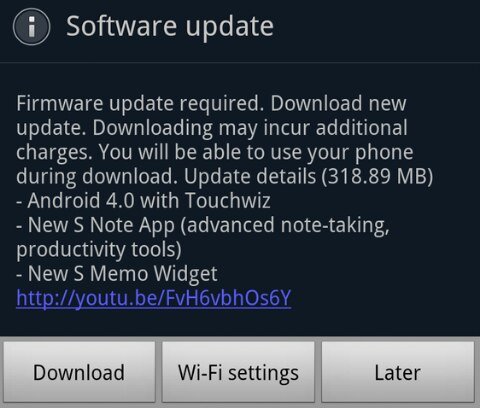
The long-waited Ice Cream Sandwich (aka Android 4.0) is quitely rolled out to unlocked Galaxy Notes. This is firstly reported by Devin Balentina.
It seems only some users in Europe can update now, and none of users in Asia can get it up to now. The size of this update is reported at 318MB. The hyped Premium Suite is included.

Of course, this update is for international version, not the US (AT&T) version.

I will post my hands-on report once my Note get updated.

Did you get the update?

Update 1: The update is only available for Galaxy Note users in Europe up to now (8:50am GMT, May 11).

Update 2: Samsung Mobile Singapore confirmed the ICS update for Singapore Galaxy Note users is still under local testing. So, Singapore Note users have to wait at least a few weeks.

Update 3: Samsung Mobile Hong Kong confirmed the ICS update will be available for Hong Konmg users in May.

Update 4: Update for US (AT&T version) Galaxy Note users has not scheduled, although the leaked ROM seems close to release. But AT&T will decide when to roll it out.

Update 5: ICS update for Galaxy Note has been rolled out in India and Korea today (May 23).

Update 6:  ICS update for Galaxy Note has been rolled out in Singapore today (May 25).

Update 7:  ICS update for Galaxy Note has been rolled out in MalaysiaHong Kong, Nepal, Bangladesh, Sri Lanka, Taiwan,the Philippines, Thailand, Indonesia and  Vietnam today (May 25)

Update 8: ICS update for Galaxy Note has been rolled out in UK today. (June 1)

Update 9:  ICS update for Galaxy Note has been rolled out in Baltic states,  Czech, Ireland, Russia, Spain and Trinidad and Tobago today. (June 8)

Update 10:  ICS update for Galaxy Note has been rolled out in Kuwait, Morocco, Portugal Slovenia,  United Arab Emirates today. (June 13)

Update 11:  ICS update for Galaxy Note has been rolled out in Iran. (June 14)

Update 12. AT&T Galaxy Note received ICS update (4.04) (July 10)

Update 13: Selected German Galaxy Notes received ICS 4.0.4 update today  (July 11)