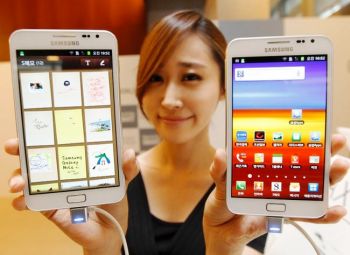
You are browsing the archive for premium suite.

Top 10 new features in Galaxy Note after ICS update

July 16, 2012 in Galaxy Note Guides, Galaxy Note News

After the official release of ICS 4.0.3 update for Galaxy Note  in May and ICS 4.0.4 update last week, some users asked me what the new features are. Thanks to Samsung’s Touch Viz UI, most users will not visually find any changes after the update. Here I prepared the top 10 new features in your Galaxy Note after the ICS update.

Each update fixes some bugs and the performance should be improved, so we usually recommend users to apply the update, although some new problems may be reported, e.g. battery issues, RAM issues. Given the short lifespan (1-3 years) of samrtphones, it is impractical to wait for the perfect firmware.

In this post I will try to introduce you the features. I will create  tutorials for some of these features later.

1. Pop- up play (ICS 4.0.4 update is needed)

pop-up-play-galaxy-notePop up play was debuted on Galaxy S3  last May. In the Googl Play store, there are a few paid apps (e.g., Stick it! (Pop-up Player)) doing the similar job. What it does is quite simple, you can watch your video and use other apps at the same time. The video will be re-sized as thumbnail and you can move it to any locations on your screen. Pretty cool, right?

Of course, only the built-in video player support this. Once the video is open, you can find the re-sizing (or pop up play?) button in the top right corner. If you want to stop the video, just touch the video area and release your finger. If you want to go to full screen, you can long press the home button to get the task manager and open the video player.

Two limitations: 1). the size of the video cannot be adjusted, at lest I did not find any ways to adjust it; 2). If you want to go back to full screen, the video will be played from the beginning, not from where you stop in the pop up play mode. Thanks to julien for correcting me. (Tap the video,  it will go back to the full screen and continue.)

2.  S Note

S Note is part of the Samsung’s Premium Suite for Galaxy Note and is installed as part of ICS update. It comes with 6 samples, 6-page S Note Tips, and a 6-page productivity Tools Tips. So, you can start to use it quite easily.

With S Note, you can directly convert your handwriting into text, convert your drawing into polygonal shapes, and convert your writing into mathematical formulas. You can even import PDF file for annotation!

After the ICS update, you should be able to find this app among your applications.

3. My Story

My Story is also part of the Premium Suite for Galaxy Note. But it is not installed automatically during your ICS update. You can download it either from Samsung Apps or Google Play store (https://play.google.com/store/apps/details?id=com.sec.android.app.mystory)

This apps help you create multimedia letter or a card or an album. It comes with 4 templates (birthday, thank you,  letter in a bottle, ans memory).

This apps need verify your phone number. So, when you open it first time, it will ask your phone number and a verification code will be sms to you. So, remember to provide correct phone number, especially country code.

4. Face unlock

Face unlock is a standard feature in ICS (Android 4.0). You can unlock your phone by using your face (and the front camera). You can turn on this by going to settings–security–screen lock. Of course, if the light is so weak, you cannot use this feature. So, your Galaxy Note will ask you to setup PIN or password as well in case your face is not recognized.

5. Notification

In ICS, notification is significantly improved. Shortcut for Settings is added there. From the lock screen, you can also launch apps directly.

6. Data usage monitor

ics-data-usageFor people with data quota, monitoring mobile data usage is important to avoid hefty and stupid charges from the greedy telecom operators. In the past, you may use some apps, e.g. 3G Watchdog to monitor the data usage. Now, it is not necessary.

Under settings, now you can find Data Usage. All your data usage will be reported here. You can set the limit, and disable background data if your data quota is very low.

7. Developers options

Occasionally, some background processes (usually from poorly written apps) may drain your battery  quite quickly, and hog on the ram. So, your system may be not so responsive. IN ICS, you can go to Settings–Developer options to setup the background process limit. You can choose No Background processes as a test if you suspect the battery drain is due to background process. Normally, you should not choose no background processes, as Android system may need this function to improve performance.

Under developers options, you have a quite a lot advanced controls, e.g., show CPU usage, or force GPU rendering.

8. Quick access to task manager/ Swipe to close

ics-task-manager-swipe-to-closeAt any time, long press Home button, you will get the task manger (pop up). From the thumbnail list of running and recent apps, you can swipe to left or right to close it . Touch it once to open the corresponding app.

9. Signature unlock (ICS 4.0.4 is required)

This is a cool feature, although not so useful. You can unlock your phone with your S Pen by signing on the screen. That’s it.

You can set it up from Settings–Security–Screen lock.

10. Chrome browser

ICS has a improved web browser. You can open up to 16   8 tabs (thanks for Thomas who found we can actually open 8 tabs in Galaxy Note, not 16, It seems Samsung gave us 50% discount.).  It sounds good?

Even better, you install Chrome browser ( https://play.google.com/store/apps/details?id=com.android.chrome) on your Galaxy Note. It is super fast and you can even share the bookmarks and browser windows with your desktop!.

Any comments? please post in the comments section below or in our Galaxy Note forum.

Top 10 questions on ICS update for your Galaxy Note

June 4, 2012 in Galaxy Note Guides, Galaxy Note News, Galaxy Note Stories

galaxy-note-ics-update-girl-with-phonesYes, ICS update is available for about one third Galaxy Note users. To get the most current    status on the availability of ICS update in different regions, you may check this post (I will update it once new info is available).

I received some inquiries on ICS update for Galaxy Note: some are through comment of the post mentioned above; others are through Google+.  For all these questions, I tried my best to answer them, and will continue to answer them.

I noticed there are some repeated questions, so I decided to put some frequently asked ones in this post to save reader’s time. It will not be just 10, as I will always update it if it is necessary.

Question #1. Why did some users get the ICS update earlier than me? 

Normally, firmware update must go through local testing. For regions with more users (and so Samsung collected more money there), the testing usually is faster. And Samsung also may put some sorts of priority for such regions.

The second reason is that the local carrier may want to bundle more bloatware (in addition to that bundled by Samsung). This may slightly delay the update availability. If your handset is subsidized, the carrier always tries very hard to give you more bloatware.

Another possible reason is marketing scheduling. For example, if Samsung is planning to launch Galaxy S3 in your region, usually it is not a good idea to release ICS update for Galaxy Note (another flagship product) just a few days before the launching event. In this case, the update will be normally scheduled after the event.

Question #2. Why should I update to ICS?

ICS update for your Galaxy Note is just a software update. Software generally is getting better and better: more stable, more functions, more compatible apps. Android 4.0 (ICS) is a major update merging software stacks for phone (Ginger Bread) and tablet (Android 3.0, Honeycomb). So, it is almost perfect for Galaxy Note, which is somewhere between phone and tablet.

Specifically, with ICS update for your Galaxy Note, you get

  • Latest Android OS optimized for the form factor of your phone
  • Premium Suite makes your Note really outstanding from other phones and tablets
  • Some cool features included in ICS: face unlock, new default font

Question #3. Will all my apps works after the update?

Theoretically, all of them should work. But some apps may actually not. So, it is a good idea to check the individual app page in the Google Play to find out whether it works on ICS  or not, or whether there are some known problems.

Normally, for apps under active development (e.g., updated at least once in last 6 months), the developer very likely has tweaked the app for ICS.

Question #4. Where is the Premium Suite? I cannot find it after the upgrade.

Premium Suite is a collection of new apps (S Note, My Story) and  enhancements to S Memo and S Pen.

After the ICS update, you can find a new app, S Note, among your apps. You can start to use it immediately.

In some regions, the My Story app must be installed manually from Samsung Apps. You can go to Samsung Apps (an app installed by default), then search “My Story”. You can then install it. When you try to open it the fist time, you need register your mobile number (an SMS with a 4-digit pin code will be sent to your mobile for verification, so make sure the country code you select is correct).

If you cannot find the app through Samsung Apps, you can also try to use Kies.

Question #5. How to get My Story app? It is supposed to be included in the Premium Suite.

See Question #4.

Question #6. Are there battery issues with the ICS update? I heard some complaints on poorer battery life and performance after the update.

Based on my personal experience, there are no noticeable difference in battery life after the ICS update. I actually had expected some improvements. For most users, it is sufficient for full day use, and you probably need charge it every night, just like me.

Actually, you may hear complaints on battery life for almost all smartphones regardless of the OS, firmware, model and the brand. Most of the time, the only solution is a replacement. I guess this is very likely hardware defects.

Of course, sometimes, some poor written apps may drain battery quite fast. But this can easily found out.

On the performance, most of the time, it is just user’s “feeling” or the slowness experienced may be just related to specific apps.

It seems after the ICS update, most apps are started automatically when you reboot your phone. So, you may try to use force stop for most of the apps or kill them with some task managers. This may make your Note more responsive. (If you can use force stop for an app, it means the app has been started. Some task managers may miss most of them, it is better to do it manually to save your battery life significantly.)

Anyway, I feel the battery life is as bad (but acceptable) as that before the update. Performance is as good as that before the update. No major improvements, and no degradation.

Update: yes, even before the update, some users already have battery issues. Please check the post How to solve battery issues after ICS update in your Galaxy Note.

Question #7. Can I easily root my Galaxy Note after the ICS update?

Please note, in most regions, rooting your Galaxy Note may void your warranty. And, no rooting method is perfect.

Yes, Samsung phones are always easy to root. After the ICS update, you can root it with CWM  (http://forum.xda-developers.com/showthread.php?t=1647148 ) or PC Odin (a bit more difficult if you never use Odin before, so I do not give your reference).

Anyway, unless you are very familiar with Android, you should not root your phone within warranty period (usually one year only) to avoid any possible issues. For most users, you don’t need root/superuser access.

Question #8. Does face unlock work well on this ICS update?

Yes, face unlock works very well on Galaxy Note. But please note, this is not a good option if security is your big concern. Password is still the safest unlock method, followed by pin code. Face unlock can be easily cheated by a photo as reported before.

Anyway, face unlock is very cool and fun.

Question #9. Why did I get the update only from Kies, not through OTA?

In most regions, the update can be obtained both through OTA and Kies. But it seems in some regions some users cannot get the update from the OTA.

The reason you cannot get the update through  OTA is mainly caused by your local vendor/carrier. Some carriers simply do not want to enable the OTA update. Another possible reason is the update server is overloaded. I also heard (unofficially) if your connection speed is regarded as too slow, you probably will not get the OTA update popup at all.

Anyway, Kies is more reliable, although sometimes is a bit slow. Familiarize yourself with Kies if you want to use Samsung phones effectively.

Question #10. Will I get Jelly Bean (Android 5.0 4.1) update for my Galaxy Note?

I contacted several Samsung offices with this question, and nobody could give any useful info. The common answer is it will be announced after Jelly Bean is officially available.

So, let me guess.

If there is no Galaxy Note 2 or some models to upgrade Galaxy Note, we will very likely get the  Jelly Bean maybe next year. The only problem is whether the 1GB RAM is sufficient or not for Android 5.0.  It seems 1GB is very likely the minimum requirement for Jelly Bean.

Updating Galaxy Note to Android 5.0 does make business sense. As the note was just release in Q4 last year, most users’ 2-year contract will only end by Q4 of 2013.The lifespan of ICS is not so long.

However, if there are something like Galaxy Note 2, then, we will definitely NOT get the official Jelly Bean update because Samsung then wants to sell more of  the new model. Just like the fate of Galaxy S. Very likely, Samsung will give you some consolations like new premium packages.

I guess Samsung was not very confident about the popularity of Galaxy Note even after the  initial release. So, they probably did not have a  plan for Galaxy Note 2.  But as the sales of Galaxy Note become far better than expected, it is very likely they started to think about a new Galaxy Note (not the Galaxy Note 10.1, which is targeted for different users.)

Anyway, there will be at least some unofficial Jelly Beans for Galaxy Note.

Do you have any other questions on Galaxy Note? Post them in comments (it won’t show up immediately, but I will receive it immediately and try to answer it ASAP).